TERRAMASTER D1 SSD Pro Review – A Fanless 80Gbps Thunderbolt 5 Enclosure With Incredible Potential
Affiliate disclosure: some links in our reviews may be affiliate links. If you buy through them we may earn a commission at no extra cost to you. Our verdicts are never influenced by partners.
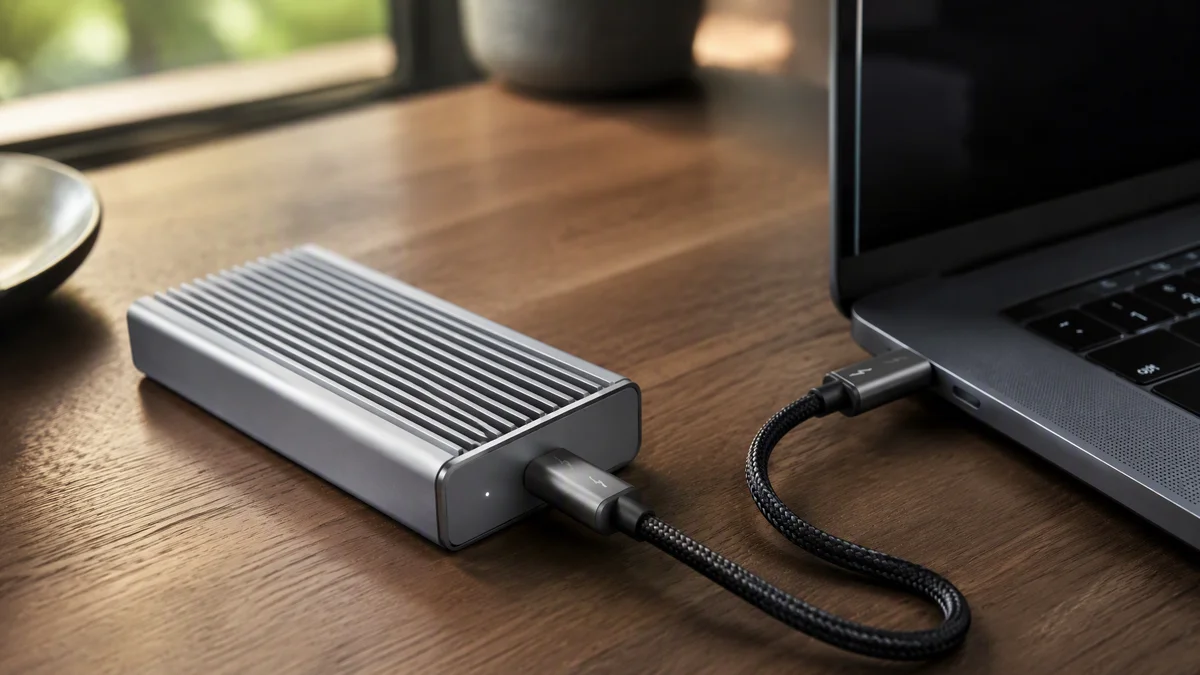
The fastest external drive most people own is whatever portable SSD was on sale last Black Friday. The TERRAMASTER D1 SSD Pro exists to embarrass those drives. It is a fanless aluminum enclosure that turns any standard NVMe SSD into an 80Gbps Thunderbolt 5 storage rocket, and after weeks of shuttling 4K footage between machines, it has permanently changed what we expect from a pocket drive.
Key Takeaways
- Thunderbolt 5 at 80Gbps, roughly double the real-world speed of the fastest Thunderbolt 4 gear.
- Completely fanless aluminum design: silent operation with serious heat dissipation.
- Bring your own NVMe SSD, so capacity and price are entirely your choice.
- Backward compatible with Thunderbolt 4 and USB4 hosts at their native speeds.
Why Thunderbolt 5 matters now
Thunderbolt 4 topped out at 40Gbps, of which storage could realistically use about 32Gbps after display and protocol overhead, translating to portable drives that plateaued around 3,000 MB/s. That was fine when internal SSDs ran at similar speeds. But internal storage moved on: drives like the one in our Samsung 9100 PRO review now push 14,800 MB/s inside your PC, which makes yesterday’s portable drives feel like dial-up. Thunderbolt 5 doubles the pipe to 80Gbps, finally giving external storage room to breathe.
The D1 SSD Pro is built to use that headroom. Paired with a fast Gen4 NVMe drive, it delivers real-world transfers that were simply impossible over previous interfaces: multi-gigabyte-per-second copies that turn an overnight footage offload into a coffee break.
Specs at a glance
| Specification | TERRAMASTER D1 SSD Pro |
|---|---|
| Interface | Thunderbolt 5, 80Gbps |
| Drive support | M.2 2280 NVMe SSD, user installed |
| Cooling | Fanless aluminum chassis, passive dissipation |
| Compatibility | Thunderbolt 5 / 4 / 3 and USB4 hosts |
| Cable | Certified Thunderbolt 5 cable included |
| Power | Bus powered, no external adapter |
| Size | Pocketable, smaller than a phone |
Performance and thermals
- With a Gen4 NVMe drive installed, sequential transfers exceed anything possible on Thunderbolt 4.
- Hundreds of gigabytes of mixed footage copied without the enclosure becoming untouchable.
- Silent throughout: passive cooling means zero noise on set or in the edit suite.
- Consistent speeds across long transfers, where bus-powered rivals often sag.
The fanless design deserves specific praise. Active cooling in tiny enclosures means tiny fans, and tiny fans mean noise exactly where you do not want it: next to microphones, in quiet edit rooms, on location. The D1 SSD Pro’s aluminum body is the heatsink, with internal thermal pads bridging the SSD to the shell. Under sustained load it gets properly warm, as physics demands, but never crossed into throttle territory with the quality Gen4 drive we installed. The silence is worth real money to anyone who records audio near their storage.
The bring-your-own-drive advantage
Because you supply the NVMe drive, the D1 SSD Pro sidesteps the biggest problem with premium portable SSDs: paying flagship prices for mystery NAND you cannot choose or replace. Slot in a proven drive, and when your needs grow, upgrade the SSD while keeping the enclosure. It is also a brilliant second life for a fast drive retired from a desktop build. If you are weighing a high-endurance option for write-heavy field work, our Sandisk NAS 800 review covers a drive built for relentless duty cycles.
Who needs 80Gbps
Video editors shuttling projects between machines, photographers ingesting card dumps in the field, and anyone whose laptop storage is a rounding error compared to their data. Thunderbolt 5 hosts are still arriving, but the enclosure is fully backward compatible, running at Thunderbolt 4 or USB4 speeds on today’s machines and unlocking its full pace when you upgrade. Buying it now is not early adoption; it is insurance.
The verdict
Setup and compatibility notes
Assembly takes five minutes: four screws open the shell, the M.2 drive slides into its slot and secures with a tool-less clip, thermal pads make contact, and the case closes. The included Thunderbolt 5 cable is certified and appropriately short for signal integrity; if you need a longer run, buy a certified cable rather than a bargain substitute, because at these speeds the cable is genuinely part of the system.
Compatibility testing covered a Thunderbolt 5 desktop, a Thunderbolt 4 laptop and a USB4 handheld. On the Thunderbolt 4 machine the enclosure negotiated the host’s full speed without fuss, and on USB4 it behaved identically to a native USB4 enclosure. There is no Thunderbolt tax to pay for future-proofing: you get today’s interface at full speed and tomorrow’s headroom in the same box. One tip from testing: format the drive on the machine you will use most, because cross-platform exFAT costs meaningful performance versus native NTFS or APFS.
Build quality overall is a step above the generic enclosures flooding the market. The aluminum shell is precisely machined with no rattles or panel gaps, the port seating is firm, and the whole unit feels like it will survive years of being thrown into camera bags. TERRAMASTER clearly learned from its NAS heritage: this is storage gear built by people who think about drives full time. At the price, it undercuts most first-party Thunderbolt 5 docks while offering more flexibility.
Full specifications are on TERRAMASTER’s official site.
External storage, unthrottled
What we loved
- 80Gbps Thunderbolt 5 finally matches storage to modern SSDs
- Silent, fanless design built like a milled ingot
- Choose and upgrade your own SSD
- Backward compatible, so it is fast today and faster tomorrow
What needs work
- Thunderbolt 5 hosts are still rare in the wild
- Gets warm under sustained load, as fanless designs do
- Total cost depends entirely on the SSD you add
The D1 SSD Pro is the rare enclosure that is ahead of the market without abandoning the present. It is silent, beautifully made, and ready for the fastest drives and hosts of the next several years. For mobile creators, it is close to essential. Our review methodology covers how we test storage.
Choosing an SSD to pair with it? Ask the team for a match to your budget.

Alex Mercer is the managing editor of Tech News Xplore. A hardware journalist for over a decade, he has benchmarked more CPUs, GPUs and handhelds than he can count, and leads the publication's testing methodology and editorial standards.