ChatGPT Work Is More Than a Chatbot: Here’s How to Get Started With OpenAI’s AI Agent
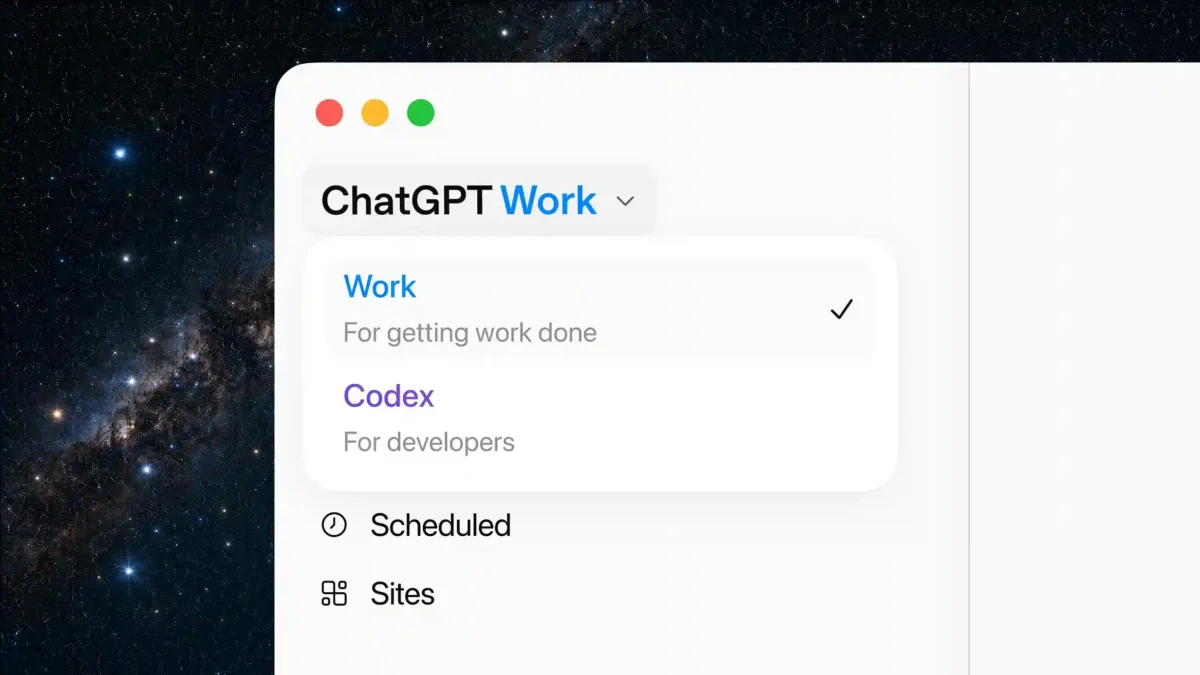
ChatGPT has always been useful for answering questions, writing text and helping with research. But OpenAI is now pushing the service toward something much more ambitious: an AI that can actually perform tasks for you.
That is the idea behind ChatGPT Work.
Rather than simply responding to a prompt, Work is designed for longer, multi-step assignments. It can work with files, navigate websites, interact with software and organize information while moving through a task from beginning to end.
For anyone who has used ChatGPT primarily as a question-and-answer tool, that represents a major change.
The important part, however, is knowing how much control to give an AI that can actually take action.
Key Takeaways
- ChatGPT Work is designed for longer, multi-step tasks, rather than quick conversational questions.
- It can work with files, websites, projects and connected tools, depending on the available permissions.
- Work is particularly useful for repetitive research, organization and professional workflows.
- Users should start with small assignments and clearly define what the AI is allowed to do.
- OpenAI recommends reviewing outputs and being careful with permissions when an AI can create, modify, move or send information.
What Makes ChatGPT Work Different?
The easiest way to understand Work is to compare it with ordinary ChatGPT.
Regular Chat is primarily conversational. You ask something, the AI generates an answer, and you decide what to do next.
Work is built around the idea of delegating a task.
OpenAI describes ChatGPT Work as an agent intended for longer, multi-step work and finished deliverables. Depending on the environment and permissions available, it can interact with files, websites and desktop applications rather than simply describing what you should do.
That distinction becomes especially obvious with complicated projects.
Imagine asking ChatGPT to analyze a large collection of documents. A conventional conversation might help you write a script or explain how to organize the files.
With Work, the objective is different: you describe the desired outcome and let the agent work through the steps.
This is the broader transition happening across the AI industry. The chatbot answers questions. The agent is expected to complete workflows.
How to Start Using ChatGPT Work
Getting started is relatively straightforward.
Open ChatGPT on the web, mobile app or desktop application where Work is available. OpenAI’s current instructions say users can select Work from the experience selector, start a new conversation or open an existing project, then provide the files, context and criteria needed for the task.
Projects can be particularly useful for longer assignments because they keep related conversations, files and instructions together. OpenAI describes Projects as workspaces intended for ongoing efforts such as writing, research and planning.
The best way to begin is not with an enormous assignment.
Start small.
Give Work a task with a clearly defined goal, such as organizing a folder, summarizing a group of documents or researching a narrowly defined topic.
Once you understand how the agent behaves, you can gradually increase the complexity.
Give Work a Goal, Not Just a Question
Prompting an agent requires a slightly different mindset from prompting a chatbot.
A weak instruction might be:
“Research smartphones.”
That leaves too many decisions to the AI.
A stronger instruction defines the objective, restrictions and expected result:
“Research current flagship smartphones, compare battery life, processor performance and camera features, exclude models above my budget, and produce a comparison table with links to reliable sources.”
The difference is important.
An agent needs boundaries.
For a larger project, it can also make sense to ask Work to create a plan before carrying out the task. This gives you an opportunity to inspect the intended workflow and catch misunderstandings before the agent starts taking actions.
That becomes especially important when the task involves files or external websites.
OpenAI says Work can use context from projects and connected tools, while its desktop experience can also interact with local folders where supported.
Files and Research Are Where Work Gets Interesting
One of the strongest use cases for an AI agent is dealing with information overload.
Consider a folder containing dozens of PDFs.
Reading every document manually, identifying common themes and organizing the files can take hours. An agent can potentially handle much of that workflow, leaving the user to review the final result rather than perform every repetitive step.
The same principle applies to research.
Instead of repeatedly searching, copying information and organizing notes, you can define the research objective and ask Work to handle the process.
This does not mean the AI should automatically be trusted with everything it finds.
Agentic systems can misunderstand instructions, choose poor sources or make incorrect decisions. The more complicated the workflow becomes, the more important human review becomes.
The goal is not to remove the human from the process.
The goal is to remove unnecessary manual work.
Permissions Are the Part You Should Take Seriously
This is where ChatGPT Work becomes fundamentally different from a normal chatbot.
A text response can be wrong.
An AI that is allowed to modify files, communicate with services or perform external actions can potentially create consequences outside the conversation.
That makes permissions critical.
OpenAI’s current guidance shows that Work operates with available tools and permissions, and users should provide the files, constraints and criteria that define what the agent is supposed to accomplish.
A sensible approach is to give the minimum access necessary.
Reading information is generally less risky than giving an AI permission to modify or delete it. Similarly, drafting an email is safer than allowing an agent to send that email automatically.
The same principle applies to files.
Keep backups of important documents before allowing an automated system to reorganize or modify them.
And never treat an AI agent like an infallible employee.
It is software.
It can make mistakes.
ChatGPT Work Can Save Time, But It Still Needs Supervision
The real attraction of Work is not that it makes AI magically intelligent.
It is that it changes where human effort is spent.
Instead of manually performing ten small operations, you can explain the desired result and let the agent handle much of the mechanical work.
That could be useful for researchers, developers, marketers, business owners and anyone regularly dealing with large quantities of information.
The productivity gains become particularly interesting when tasks are repetitive.
OpenAI also supports scheduled and recurring workflows in its broader Work experience, allowing certain jobs to be repeated without starting from scratch each time.
But automation should not become an excuse to stop checking the results.
The more important the task, the more carefully the final output should be reviewed.
For financial documents, business communications, legal material or sensitive data, human verification remains essential.
ChatGPT Work Signals the Next Stage of AI
The arrival of agent-style functionality changes the conversation around AI.
For years, the question was mostly: “How good are these models at generating information?”
Now the more interesting question is: “How much work can they actually complete?”
ChatGPT Work is part of that transition.
OpenAI is positioning it as an experience for multi-step work, while keeping Codex focused on software development and technical tasks.
That separation is revealing.
AI companies are no longer building only smarter conversational models. They are building systems capable of using those models as operators inside real workflows.
That creates enormous potential for productivity, but it also raises the stakes when something goes wrong.
The best way to use ChatGPT Work today is therefore not to hand over everything and walk away.
Start with a clearly defined task.
Give the agent only the access it needs.
Review what it does.
Then gradually expand the level of delegation as you become comfortable with its behavior.
That balance between automation and human control will probably define how useful AI agents become in everyday work.
For more AI tools, productivity tips and technology news, visit TechNewsXplore.
Official Sources
OpenAI Help Center — ChatGPT Work and Codex
Official documentation explaining the difference between Chat, Work and Codex, plus how to start using Work:
https://help.openai.com/en/articles/20001275/
OpenAI Academy — ChatGPT Work
Official introduction to ChatGPT Work, recurring tasks, connected tools and practical workplace use cases:
https://openai.com/academy/chatgpt-work/
OpenAI Help Center — Projects in ChatGPT
Official guide to using Projects for keeping chats, files and instructions together:
https://help.openai.com/en/articles/10169521-projects-in-chatgpt/
OpenAI Help Center — Creating and Editing Documents, Spreadsheets and Presentations With ChatGPT Work
Official documentation covering file creation, editing and workflows inside Work:
https://help.openai.com/en/articles/20001278

Alex Mercer is the managing editor of Tech News Xplore. A hardware journalist for over a decade, he has benchmarked more CPUs, GPUs and handhelds than he can count, and leads the publication's testing methodology and editorial standards.