OpenAI Codex Micro Review: This $230 AI Keypad Is Cool, Clever and Very Hard to Justify
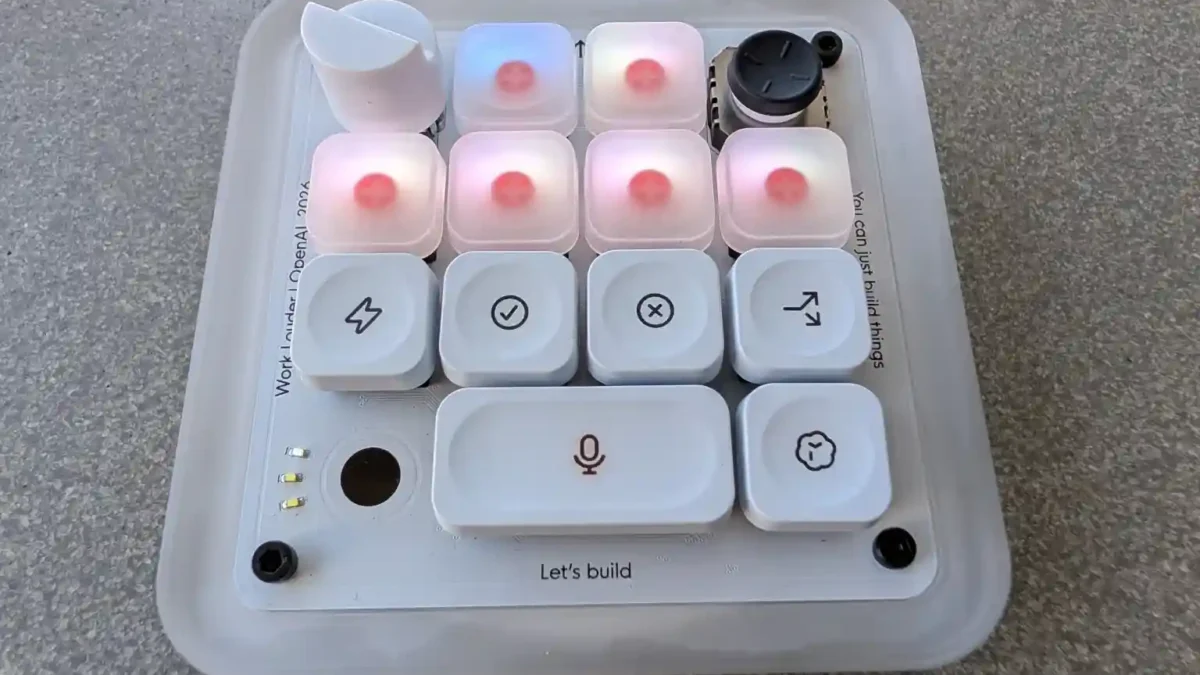
OpenAI’s Codex Micro looks like the kind of gadget you’d expect to see controlling a spaceship in a retro-futuristic game.
Glowing keys. A tiny joystick. A rotary dial. Mechanical switches. And, naturally, physical controls for managing AI agents.
But underneath the unusual design is a much simpler idea: the Codex Micro is a $230 shortcut controller built to make OpenAI’s increasingly agent-driven coding workflow feel physical.
That’s both what makes it fascinating and what makes it extremely difficult to recommend to most people.
Key Takeaways
- The Codex Micro costs $230 and was developed by OpenAI with boutique keyboard maker Work Louder.
- Six illuminated Agent Keys can show whether assigned Codex agents are idle, thinking, finished, waiting for input or encountering an error.
- Users can trigger Codex actions, use voice input, launch workflows and change an agent’s reasoning level without relying entirely on mouse controls.
- It connects through Bluetooth or USB-C and supports Windows and Mac.
- The limited-edition model is currently sold out, highlighting surprising demand for dedicated AI hardware.
Codex Micro turns invisible AI agents into something physical
AI coding agents are strange compared with traditional developer tools.
You give one a job, move to something else and potentially come back several minutes later to find it finished—or waiting for permission to continue.
OpenAI’s answer is to put those invisible processes on your desk.
The Codex Micro includes six frosted Agent Keys that can represent different Codex threads. Their RGB lighting communicates what each assigned agent is doing.
White means idle. Blue indicates thinking. Green signals completion. Amber tells you the agent needs input, while red represents an error.
It sounds gimmicky until you imagine supervising several agents simultaneously.
Instead of repeatedly opening different conversations to see whether they’re finished, a quick glance at the keypad gives you a miniature status dashboard.
OpenAI describes the device as a “command center for agentic work,” and that’s probably the best way to understand it. This isn’t a keyboard replacement and it certainly isn’t an AI computer running models locally.
It’s a hardware interface for software already running through Codex.
The buttons can genuinely reduce workflow friction
The interesting part isn’t simply watching colorful keys flash.
Codex Micro provides dedicated controls for actions developers might perform repeatedly while working with AI agents.
Command Keys can be mapped to actions such as accepting or rejecting changes, starting another conversation and activating push-to-talk. The joystick can launch common Codex workflows, including debugging, refactoring code and reviewing pull requests.
Then there’s the rotary dial.
OpenAI lets users assign it to the reasoning level used by an agent. Turn it down when you want a faster response for something simple; turn it higher when the problem deserves more computational effort.
That’s probably the most “AI-native” idea on the entire device.
Traditional shortcut pads are built around applications. The Codex Micro is built around managing the behavior of agents.
And as AI development shifts from asking one chatbot a question to supervising multiple autonomous tasks, that distinction could become important.
For more coverage of emerging AI tools, developer hardware and next-generation computing, readers can follow the latest updates on [TechNewsXplore].
Beautiful hardware doesn’t automatically mean better coding
Here’s where the Codex Micro runs into trouble.
It doesn’t make Codex smarter.
It doesn’t debug a broken application by itself. It doesn’t magically improve an AI-generated website. And it won’t suddenly turn a beginner into an experienced developer.
The device mostly removes clicks, window switching and repeated interactions.
That’s useful—but $230 useful?
For most people, probably not.
A developer who occasionally asks Codex to write a function or explain an error can accomplish practically everything with an ordinary keyboard and mouse.
The calculation changes for someone managing multiple Codex agents throughout the day. If you’re simultaneously running a refactor, testing another branch, generating documentation and waiting for an agent to review code, physical status indicators start making more sense.
There’s also considerable customization available.
OpenAI lists Bluetooth and USB-C connectivity, support for Mac and Windows, RGB lighting, mechanical switches, a touch sensor, rotary encoder and planar joystick. The package also includes a collection of custom icon keycaps.
Work Louder says the controller supports six programmable layers when used with its Input software, opening the door to many more customized shortcuts beyond the default Codex setup.
That makes the hardware more capable than its small footprint initially suggests.
Still, capability and necessity aren’t the same thing.
The biggest Codex Micro story may have nothing to do with coding
Perhaps the most interesting part of the Codex Micro isn’t whether you should buy one.
It’s that OpenAI made it at all.
Codex increasingly revolves around developers supervising agents working asynchronously and in parallel. OpenAI describes its Codex app as an interface built specifically for managing multiple agents and long-running tasks rather than simply chatting with one assistant.
The Micro takes that concept and asks a provocative question: if AI agents become permanent digital coworkers, will we eventually want dedicated physical controls for them?
Today, that means a glowing key showing that your coding agent has finished.
Tomorrow, it could mean control surfaces for research agents, design systems, autonomous business workflows or entirely new categories of AI hardware.
That’s where the Codex Micro becomes more interesting than its specification sheet.
OpenAI’s official store currently lists the $230 limited-edition device as sold out. That doesn’t prove everyone suddenly needs an AI keypad, of course. Limited production can make demand difficult to judge.
But it demonstrates that there is at least an audience willing to experiment with interfaces designed specifically for agentic computing.
A fascinating preview, not an essential accessory
The Codex Micro sits in an unusual place.
As a productivity purchase, it’s hard to justify unless Codex already plays a major role in your daily workflow.
As an experiment in how humans might control AI agents, though, it’s far more compelling.
The hardware is thoughtfully designed. Live agent indicators solve a real visibility problem. Physical approval controls can reduce context switching. Voice shortcuts, customizable commands and the reasoning dial all make AI software feel surprisingly tangible.
But none of that changes the central reality: a $230 shortcut pad remains a luxury.
For casual ChatGPT users and beginner vibe coders, the money would almost certainly be better spent elsewhere. For developers already orchestrating multiple Codex agents all day, however, it could become one of those strangely specific desk accessories that starts feeling indispensable after enough use.
The Codex Micro therefore isn’t the future of AI hardware by itself.
It may be something more interesting: an early experiment showing what controlling a future filled with AI agents could actually feel like.
Confirmed Facts vs. Interpretation
Confirmed: The Codex Micro costs $230, was created with Work Louder, supports Bluetooth and USB-C, works with Mac and Windows, includes live RGB agent-status controls, customizable commands, a joystick and a rotary control, and is currently listed as sold out.
Analysis: Whether dedicated AI controllers become a mainstream hardware category remains unknown. The Codex Micro demonstrates one possible interface for agent-based computing, but its commercial success cannot be determined from a limited-edition sellout alone.
Official Sources
- OpenAI Supply Co. — Official Codex Micro product page and specifications OpenAI Codex Micro product page
- Work Louder — Official Codex Micro hardware details and controls Work Louder Codex Micro page
- Work Louder — Official Codex Micro setup guide and RGB status documentation Codex Micro setup guide
- OpenAI — Official overview of the Codex app and multi-agent workflows Introducing the Codex app

Alex Mercer is the managing editor of Tech News Xplore. A hardware journalist for over a decade, he has benchmarked more CPUs, GPUs and handhelds than he can count, and leads the publication's testing methodology and editorial standards.