ASRock X870E Taichi White: a premium AM5 motherboard with 10G LAN and WiFi 7
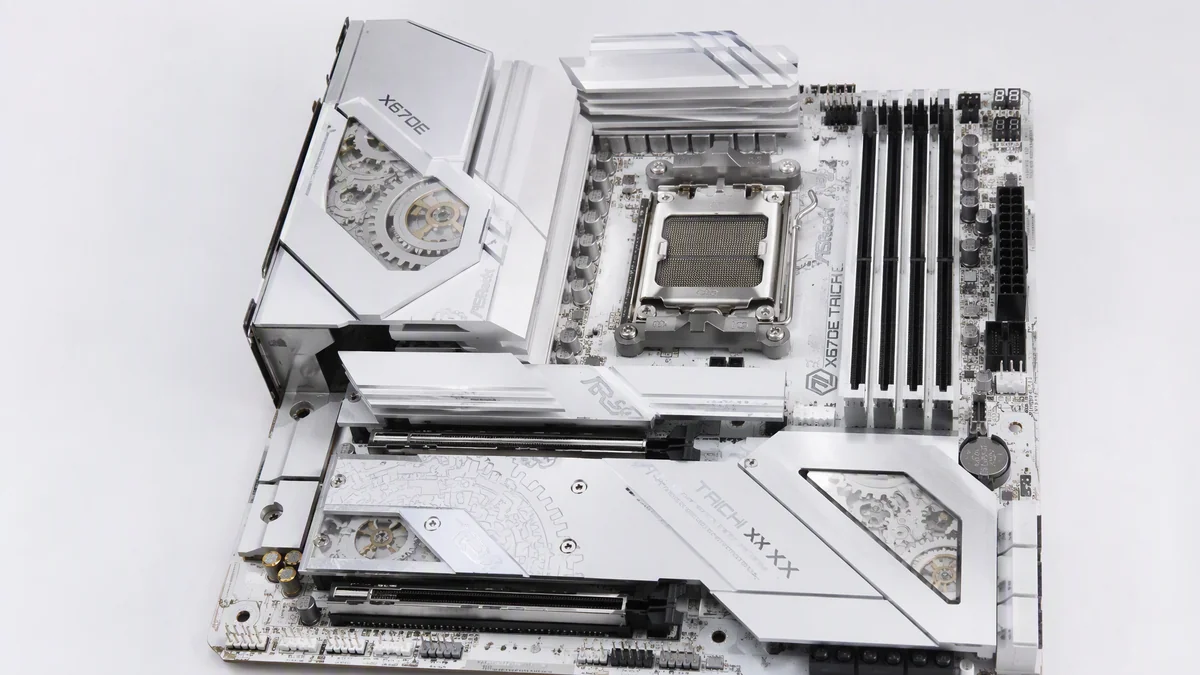
White PC builds have a dirty secret: for years, choosing the clean arctic aesthetic meant accepting second tier hardware. ASRock clearly got tired of that compromise, because the X870E Taichi White takes the company’s AM5 flagship and gives it the full white treatment without giving up a single feature that matters.
Key Takeaways
- The X870E Taichi White is ASRock’s flagship AM5 board with a genuine white PCB, not just white heatsinks.
- 10G Ethernet and WiFi 7 come standard, no add in cards required.
- The VRM is overbuilt enough for Ryzen 9000 X3D chips under sustained all core loads.
- Four M.2 slots, USB4 and tool free storage mounting round out a premium package.
A real white PCB, finally
Most “white” motherboards cheat: white heatsinks over a black or brown PCB, with the truth visible between the slots. The Taichi White commits to a proper light colored PCB with matching silkscreen, silver heatsinks and restrained RGB that defaults to off. Paired with the signature Taichi cogwheel motif on the chipset heatsink, it is the rare flagship that looks considered rather than sticker bombed.
Underneath the paint, this is the same X870E foundation we have come to expect from the Taichi line: dual chip Promontory 21, full PCIe 5.0 bifurcation for both the graphics slot and the primary M.2, and memory support tuned for high speed DDR5.
Specs at a glance
| Component | ASRock X870E Taichi White |
|---|---|
| Socket | AMD AM5, Ryzen 7000 / 8000 / 9000 ready |
| Chipset | AMD X870E (dual Promontory 21) |
| VRM | 24+2+1 phase power design, 110A SPS stages |
| Memory | 4x DDR5, up to 256GB, EXPO and high frequency support |
| Expansion | 1x PCIe 5.0 x16, 1x PCIe 4.0 x16 (x4 electrical) |
| Storage | 4x M.2 (1x PCIe 5.0 x4, 3x PCIe 4.0 x4), 4x SATA |
| Networking | 10G Ethernet, WiFi 7, Bluetooth 5.4 |
| USB | 2x USB4 Type-C, multiple USB 3.2 Gen 2, front panel Type-C |
| Audio | Realtek ALC4082 with ESS DAC |
Networking that skips the add in card tax
Here is the part that will make home lab people sit up: 10G Ethernet on the rear I/O, standard. For creators shuffling multi-gigabyte project files to a NAS, or anyone running a small home server, that single port eliminates a PCIe add in card, its driver quirks and its occupied slot. WiFi 7 sits alongside it with the newer 320MHz channels and Multi Link Operation, which translates to genuinely lower latency for wireless gaming in crowded apartment RF environments.
VRM built for X3D chips and beyond
A 24+2+1 phase design with 110A smart power stages is, frankly, overkill for any current AM5 CPU, and that is exactly the point. Running a chip like the AMD Ryzen 7 9850X3D leaves the VRM so under-stressed that heatsink temperatures barely move, which means silent operation and headroom for whatever AMD bolts onto this socket next. AM5 has been promised through 2027 and beyond, and this board is clearly built with that full lifespan in mind.
Builder friendly details that add up
ASRock has embraced the quality of life features that used to be exclusive to its biggest rival: tool free M.2 heatsinks and slot latches, a quick release button for the graphics card, a debug LED and BIOS flashback on the rear I/O. None of these are exciting in a spec table. All of them matter at 11pm when you are elbow deep in the case trying to reseat a GPU.
The BIOS story has improved as well. ASRock’s interface remains less polished than the market leader’s, but the options that enthusiasts actually touch, EXPO profiles, curve optimizer, per-CCD tuning, are all present and sensibly organized.
Memory headroom and the AM5 longevity play
DDR5 tuning on AM5 has matured dramatically, and high end boards now post memory speeds that were fantasy at the socket’s launch. The Taichi White’s four layer optimized trace layout and daisy chain topology are built for exactly that: running two DIMMs at aggressive EXPO speeds with the kind of stability that used to require hours of manual training. Four DIMM configurations remain more conservative, as physics dictates, but support up to 256GB means the workstation crowd is covered when capacity outranks frequency.
The longevity angle deserves emphasis. AMD has committed to the AM5 socket through 2027 and beyond, which makes a flagship board purchase today a platform investment rather than a single CPU accessory. Buying overbuilt power delivery and modern connectivity now is how you avoid the mid-cycle motherboard swap when a future chip generation raises the bar.
Rear I/O and everyday usability
The back panel reads like a wish list: the pair of USB4 Type-C ports flanking a generous spread of USB 3.2, the 10G jack beside the WiFi antenna connectors, BIOS flashback and clear CMOS buttons within thumb’s reach, and a clean audio cluster fed by the isolated audio section of the PCB. Inside the case, front panel USB-C with fast charging support means your phone charges at full tilt from the case port, a small luxury you notice daily. These are not glamorous details, but flagship boards earn their price in exactly this kind of daily usability math.
Where it fits in the X870E stack
The Taichi White sits at the top of ASRock’s AM5 lineup, and it is priced like it. What you are paying for over midrange X870 boards is the networking suite, the VRM headroom, the USB4 ports and, yes, the aesthetic. If none of that matters to you, a board half the price will run the same CPU at the same clocks. But that has always been the deal with flagships: you buy them because you want everything, in one box, done properly. Our review methodology explains how we evaluate whether that premium is justified when full reviews land.
The complete specification sheet lives on ASRock’s official product page.
The bottom line
The X870E Taichi White ends the white build tax. A true white PCB, 10G LAN, WiFi 7, USB4 and a VRM that will outlive several CPU generations is a flagship spec sheet with zero aesthetic compromise. White builds used to mean settling. With this board, they mean starting with the best AM5 has to offer and picking a color.
Building a white AM5 rig? Send us your parts list questions and we will sanity check the pairing.

Alex Mercer is the managing editor of Tech News Xplore. A hardware journalist for over a decade, he has benchmarked more CPUs, GPUs and handhelds than he can count, and leads the publication's testing methodology and editorial standards.